ECLIENTProtected Environment
A lightweight executable client that verifies your Steam identity, monitors session integrity, and keeps servers clean.
Steam Only
Authentication
Easy to Use
Execute and Play!
24/7 Session
Continuous Monitoring
Built for integrity
Steam identity verification
OAuth-based Steam login binds your account to a machine-unique hardware fingerprint. No credentials ever stored locally.
Encrypted session comms
All telemetry and heartbeat data is encrypted with AES-256-GCM over a secure WebSocket channel with nonce-based replay protection.
Real-time session monitoring
Memory polling at ~60 Hz captures gameplay events. Periodic heartbeats and server-requested scans keep the session continuously validated.
HWID fingerprinting
A hardware-derived fingerprint correlates sessions across reconnections bound to the originating machine.
Live Screenshots from players
Take screenshot of the suspicious player's screen without asking for the image manually. Everything automatic for further investigations.
Files Integrity check
Ensures the authenticity and completeness of all client files through cryptographic hashing and signature verification.
Up and running in minutes
Download
Grab the latest EClient release and run the executable. No installation wizard required.
Agree to EULA
Read and accept the terms of use. Data collection is limited to gameplay integrity events only.
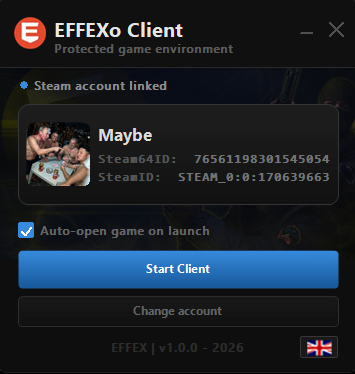
Link Steam
Authenticate via Steam OAuth or enter your ValveID. Your token is cached locally with HMAC protection.
Start Client
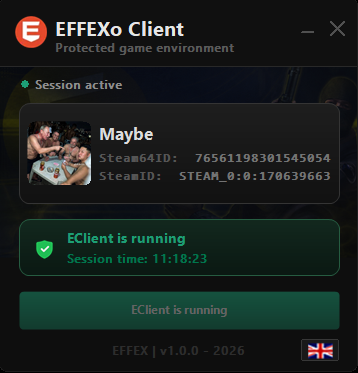
Hit Start. EClient connects to the backend, establishes the session, and monitors the game in the background.
Minimum to run smoothly
Operating System
Windows 10 (version 1803 or later) or Windows 11. Older versions are not supported.
Processor
3.5+ GHz dual-core CPU. Any modern processor will work fine.
RAM Memory
2 GB RAM minimum. The anti-cheat itself uses less than 50 MB during operation.
Disk Space
50 MB free space. The executable is lightweight and stores only session data.
Graphics Card
DirectX 9 compatible GPU. Same requirement as CS 1.6 itself. No additional overhead.
Network
Broadband connection with internet access. Latency under 100 ms to ac.effexo.net recommended.
Requirements
CS 1.6 updated, and Visual C++ 2015-2022 Redistributable Package installed.
Firewall / Antivirus
Ensure EClient.exe is allowed through your firewall for outbound HTTPS (port 443). Add an exclusion in your antivirus to prevent false positives.